How To Open Trades In The CRM

Published: 2024-11-27 03:39:30
14 Views
Training and Educational Resources

IN THE CRM


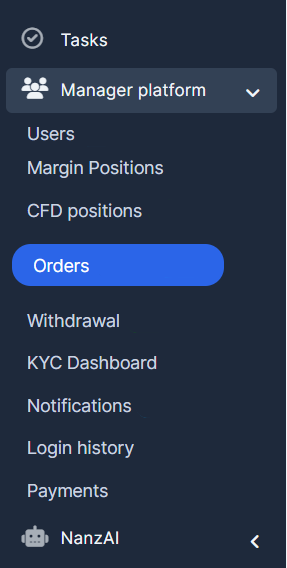
1. Go to "Manager platform" in the left menu and select "Orders".


2. Click the "New order" button in the top right corner.


3. Follow the 5 steps of creating an order by clicking the "Continue" button in the bottom-right on every stage.



Did you find this article useful?

  • Add Balance to Account

    1. Make sure that the user is already a trader: Open a Trading account/Convert to Traders. Find "Tr...

  • Applying Subscription

    1. Open the Podcator app: https://app.podcator.com/ 2. Press on "Manager" option on the left side ...

  • Finding FAQ

    To find FAQ visible for every user/admin, use the link: https://crm.podcator.com/knowledge_base Or r...

  • Enabling/disabling practice/real acc

    1. Go to the "Admin" button in the settings on the left side of the page. Press on "Trading" out of...

  • Adding default tokens

    How to make it so the default Watchlist information showed the currencies you want. 1. Set the list ...