Why My Agents Can't Log in to the CRM?
The agents have to get throught a little security process to log in freely. Only agents with the admin role are free to ignore these steps.
There are a few important steps your agents must verify:
- Make sure the credentials are written correctly. Even a small gap can cause an issue - the system will not accept credentials if they don't 100% match the ones which were registered in the crm. The gaps cannot be made before, after or in between the words.
- Make sure your agent was whitelisted. Up to your convenience, you can choose on how to whitelist the staff member: by the IP or the email. For more information, visit this article: How To Whitelist Staff Members?
- If the steps above are done and you are certain that you've done everything right but the agent still cannot log in, make sure to also clear the log.
IN THE CRM
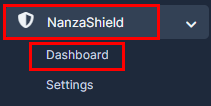
1. Go to "Nanza Shield" on the crm in the menu on the left side of the page. Choose "Dashboard" tab.
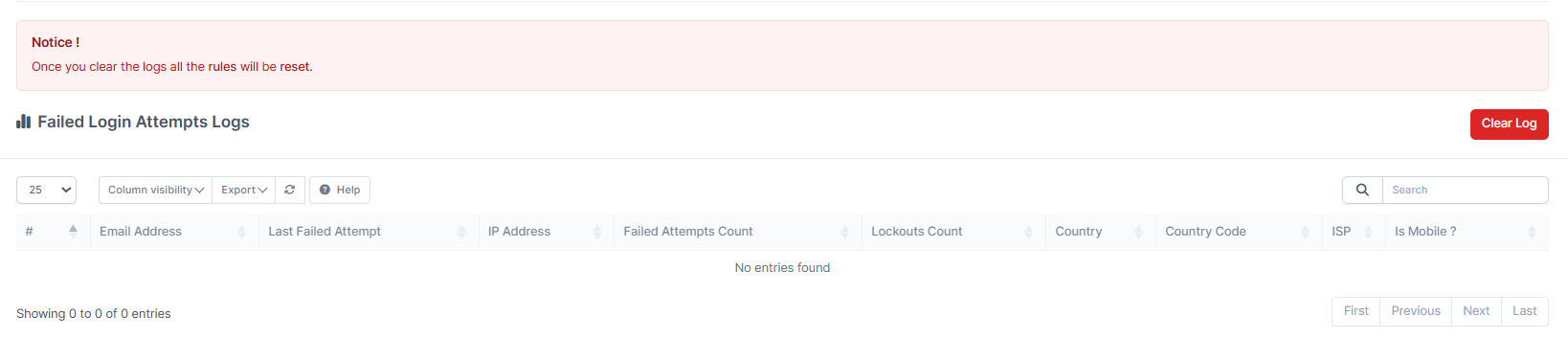
2. Scroll down to fild "Clear Log" button and press on it. Here as well you will be able to view unsucceful attempts of logging in to your crm.
3. Ask your admin to log in. If all the steps were completed, your agent shouldn't have any issues.
Additionally, you can also check this
Due to the updates that might come in handy
1. Go to "Setup" in the crm in the menu on the left side of the page.

2. Find "Modules" tab.

3. Find "Nanza Shield" module and press on "Upgrade Database".